There’s a staggering number of first- and third- party Alexa skills on offer. Many of them are just perfect for entertaining (and sometimes educating) your kids and teens.
Suitable For Kids
The first five Alexa skills for kids listed here are okay for younger children. As well as anyone you don’t want to expose to themes and information that might be better suited for older teenagers. That being said, you should still supervise your children’s interaction with any third-party skill!
Animal Workout
There are few things as stressful as having a bunch of energetic children cooped up at home. Whether it’s thanks to a snow-day or a government lockdown, it’s good to have a physical outlet for all that pent up energy.
Animal Workout offers exactly that. Alexa will encourage your kids to pretend that they are different animals, while at the same time sneakily getting them to move their bodies. It’s not exercise if you’re having fun, after all.
Sesame Street
Does Sesame Street require any introduction? If your young ones are already hooked on the evergreen children’s show, this official app from the Sesame Workshop is sure to be a delight. The skill for kids is actually focused on the hyper-popular Elmo character. You can ask him about the word of the day and play a game of hide-and-seek.
It’s pretty basic right now, with the developers working on making it a little more interactive, but for preschool-age kids it’s the perfect dose of on-demand Elmo whenever they need it.

No Way That’s True
Nickelodeon’s come out swinging in the world of Alexa kid skills, with their fun trivia game. It’s based around a set of global facts that will make you question whether something could possibly be true.

It’s a game for up to four players and features popular characters players might run into during play, such as Spongebob Squarepants.The game is suitable for kids aged 6 and older.
Meow!
Sometimes, when it comes to really young kids, simpler is better. Meow! is an Alexa skill that does exactly what it says on the tin. If you say “Alexa, meow meow” and you’ll trigger a cat conversation that could go on for hours. Chatting to Alexa in “cat language” is a pretty simple (if cute) trick, but it’s also fun for kids of all ages.
Suitable for Teens
These next five Alexa skills for kids are suited for teenagers and older adolescent teens. While they don’t have explicit content and are generally family friendly, some might make reference to events and themes that could require parental guidance.
Jeopardy!
While Nickelodeon’s trivia game might keep younger kids enthralled, by the time your teens are older there’s a good chance they might be bitten by the Jeopardy! bug. In case you didn’t know, this is a trivia game show with a twist. Contestants have to answer the cryptic clue in the form of a question.

Sadly, you won’t be in line to win any real money or actually meet Alex Trebek. Other than that it’s pretty much just like being on the show. Though it seems the latest format change to the game on Alexa has been a little less than popular among long-time players.
Age Rating: Guidance Suggested
This Day in History

Created by none other than the History channel, this free Alexa skill for kids lets you learn a cool fact about history that happened on the day you asked it. This is a skill that’s both fun and educational. Especially if you’ve got a teen who’s into history.
Age Rating: Guidance Suggested
Rock Paper Scissors Lizard Spock
Inspired by the made-up game from the TV show The Big Bang Theory , Rock Paper Lizard Spock is a more complex and interesting version of the classic Rock Paper Scissors game.
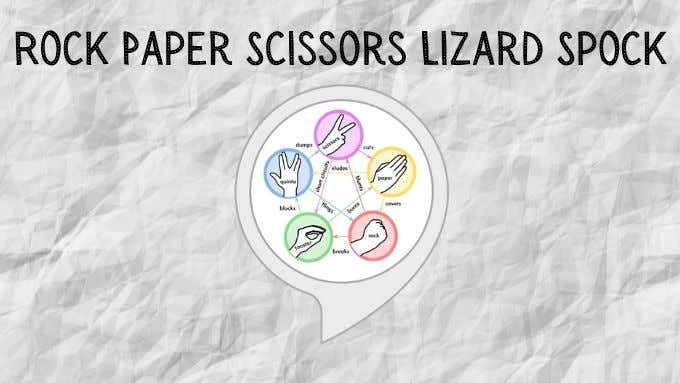
You’ll compete against Alexa to see who’s best at choosing the correct weapon to trump their opponent. Even better, the skill has recently received an update that’s added a global scoreboard. So you can see just how good you are at this silly game compared to all the other huge nerds in the world.
Age Rating: Guidance Suggested
The Magic Door
Do you remember text-based adventures like Zork? What about those neat Choose Your Own Adventure books? The Magic Door is like that. However, instead of reading you listen to your Alexa device and speak back to it.
There are 11 paths to follow which you’ll need to explore in order to experience all the different adventures that lay beyond the Magic Door. The storytelling and production values of the Magic Door are widely-praised and it’s a genuinely creative use of technology. It offers a unique gameplay experience you’re not going to get on your Xbox or Playstation. In fact, this might be the perfect skill to pull your teenage children away from their consoles!
Song Quiz
What do teenagers like more than music? Wait, don’t answer that! It’s probably something horrible we’re too old to understand.
Still, music is something that can bring people together. The Song Quiz Alexa skill is a fantastic way to bond with your older teenage kids over pop tunes from the 60s, 70s, 80s, 90s, 2000s and 2010s. You’ll hear a snippet of music and have to guess the title and artist.
Age Rating: Guidance Suggested
Alexa, Keep Them Busy While I Escape
Being a parent is a full-time job, but you can still use modern technology to smooth out the rough spots every now and then. This is just a small taste of the many Alexa skills that are either aimed at children or would appeal to children of all ages. Even ones that can legally drive and pay their taxes.
- How to Create Alexa Skills for Your Business or Employees
- How to Create Skills With Alexa Blueprints
- How to Shop With Alexa for All Your Shopping
- 10 Cool Alexa Tricks to Try With Your Amazon Echo
- How to Change Alexa Language to Spanish and Other Languages
However, you may be looking for something in particular. Maybe you want a trivia game about your family, a fairy tale where your child is the star character or a guide to your home and neighborhood for a houseguest.

Well, guess what? You can make your own skill using Alexa blueprints. Here’s how!
Browse Alexa Skill Blueprints
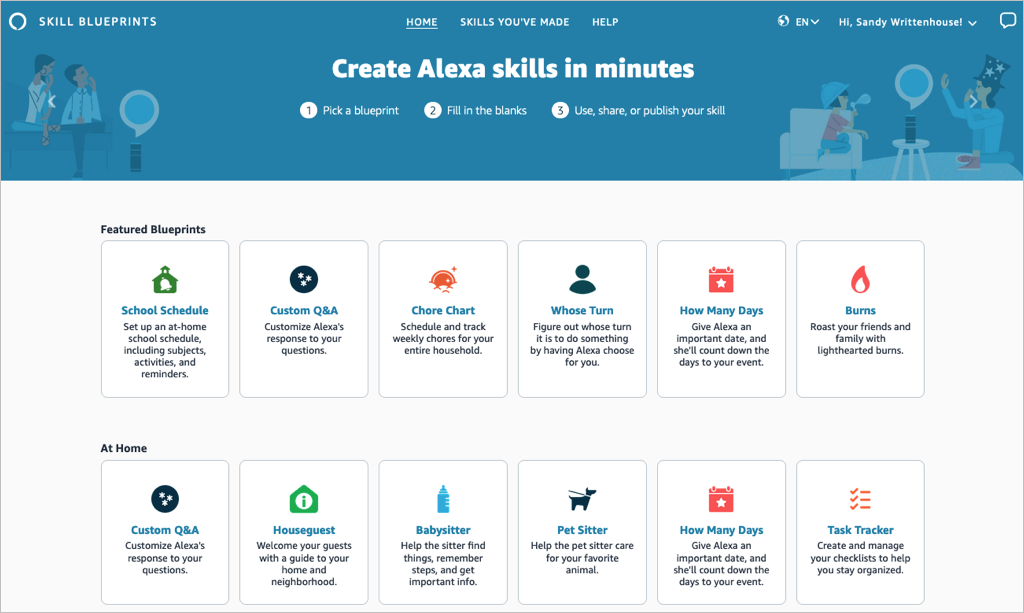
Select a blueprint to view more details and check out examples. This helps you see how the babysitter blueprint can help when you’re away, or the family jokes blueprint can liven up quality time.
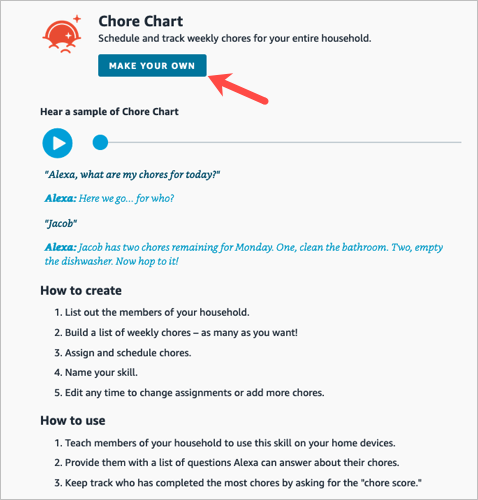
If you find one you want, pick Make Your Own on the skill information screen.
Create a Skill
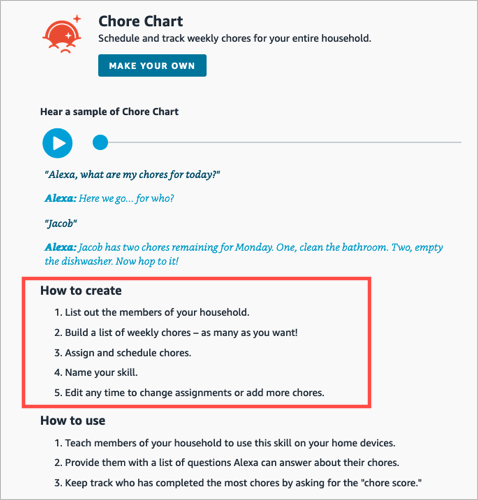
The steps are the same whether you’re creating a skill with a blueprint on the web or on your mobile device. However, those steps may differ depending on the type of blueprint you select.
For instance, you’ll enter different information for a birthday trivia skill compared to one for flashcards, the pet sitter, or bedtime stories. You can see these steps when you select a blueprint to view its details.
To show you just how easy it is, we’ll create one on each device.
Make a Chore Chart Skill on the Web
For this first example, we’ll use the Chore Chart blueprint to create a skill on the website. This skill helps keep track of household chores and who is responsible for each one.
- Visit the Alexa Blueprints website, sign into your Amazon account, and choose a blueprint.
- As described above, select Make Your Own directly below the skill name. If you see a short tutorial for building the skill, choose Start Now when you get to the end.
- Next, you’ll be prompted to replace the details for the skill with your own. For the Chore Chart, we’ll fill in the names of our household members and chores.
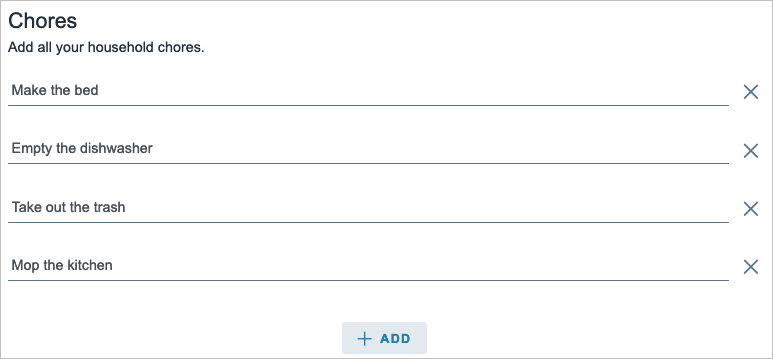
- Select Next on the top right to move to the next step.
- Here again, you may be asked to enter more details for the skill. For the Chore Chart blueprint, we assign the chores to the household members. Just keep in mind that the number of prompts and requested details depend on the exact skill and blueprint.
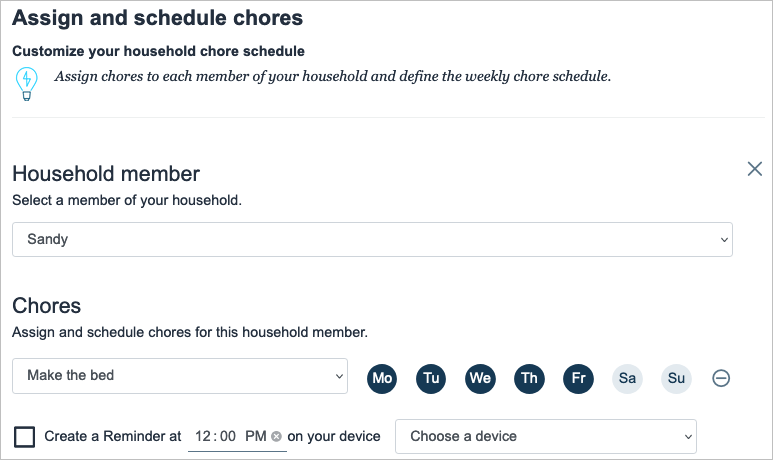
- Select Next to continue.
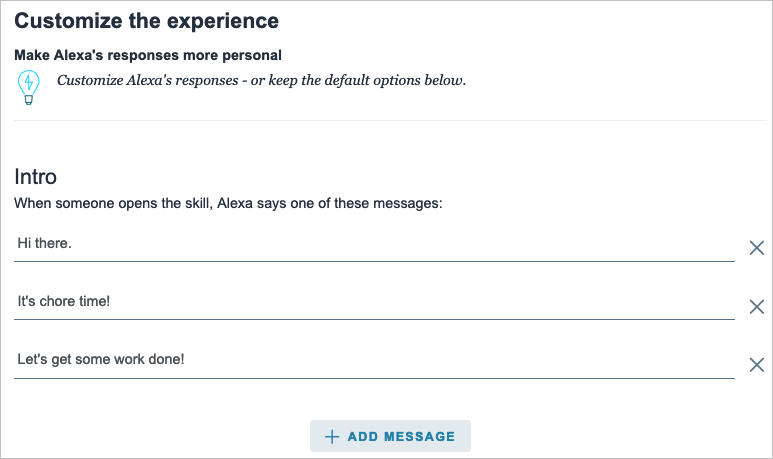
- One step that you’ll find in most blueprints is for customizing the experience. This refers to how you interact with Alexa for that particular skill. For instance, you can enter introduction phrases for when someone opens the skill and then other phrases for when someone completes a chore. These are the phrases Alexa uses for that specific skill.
- Select Next to finish entering the details.
- The final step in creating a skill is to give it a name. Try to use something meaningful that you’ll remember but also something simple enough for Alexa to recognize.

- Select Next one last time to create the skill.
After a few moments to process all the information, your skill should be ready to use!

Make a Whose Turn Skill in the Mobile App
For this next example, we’ll use the Whose Turn blueprint to create a skill in the Alexa app. This skill prompts Alexa to choose whose turn it is to do something.
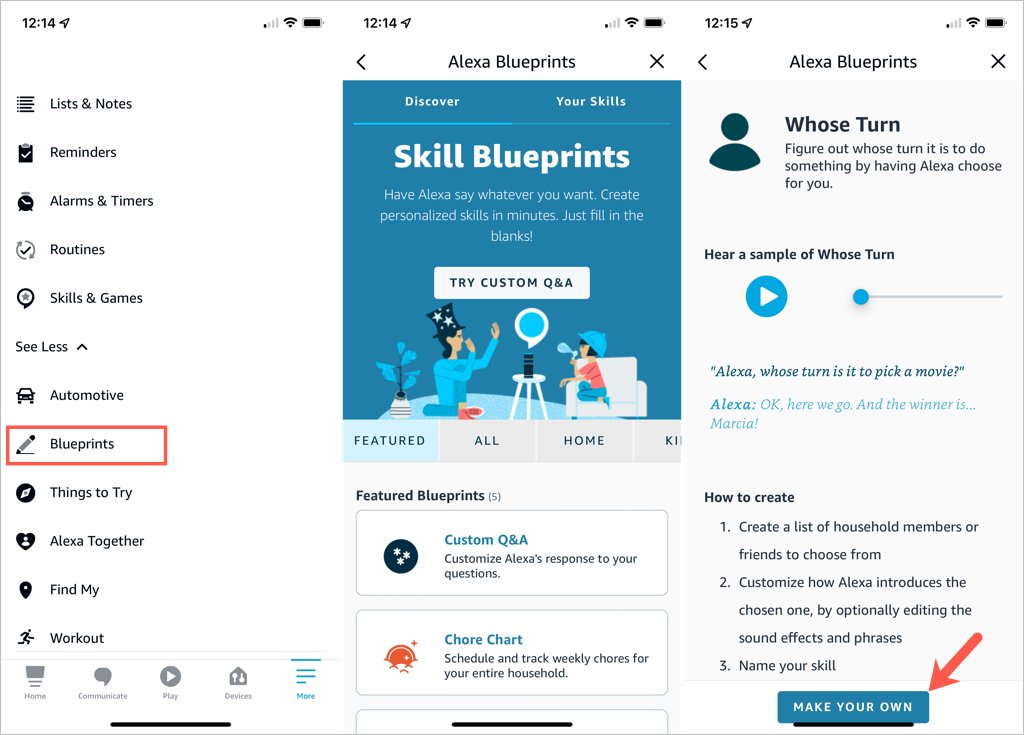
- Open the Alexa app on Android or iOS and select the More tab.
- Pick See More in the top section and choose Blueprints .
- Browse the options by category, just like on the website. Then, select the one you want to use and tap Make Your Own .
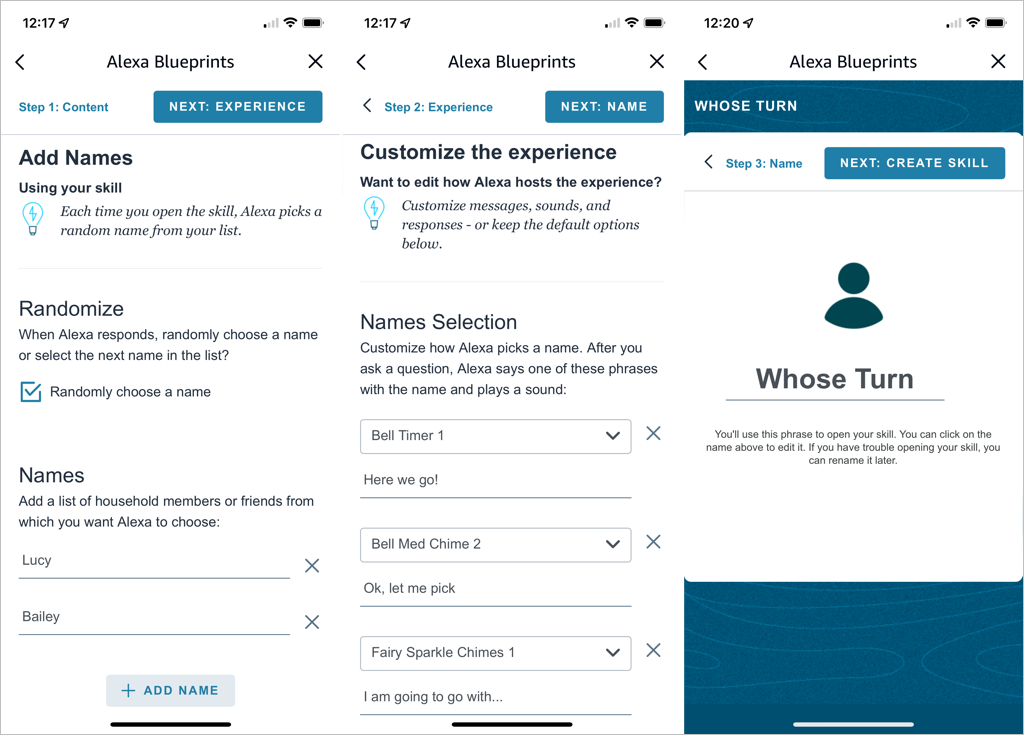
- Replace the details for the skill with your own. For the Whose Turn skill, we’ll add the names for Alexa’s choices.
- Tap Next on the top right to continue.
- The next step for the Whose Turn skill is to personalize the experience. This allows you to customize how Alexa picks a name. After you ask a question, Alexa uses the phrases and sound effects you select in this section. Optionally, you can scroll down for additional customization options.
- Tap Next to name your custom skill.
- Select the text on the name line to edit it or enter your own. Again, pick a meaningful name and one that’s easy for Alexa to recognize.
- Tap Next to create the skill.
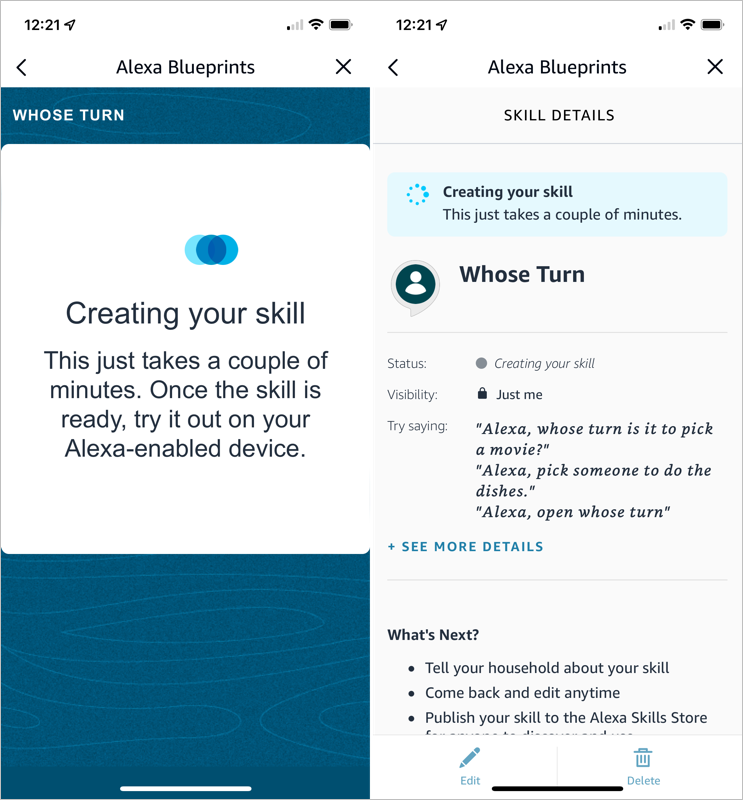
You’ll see the progress as your skill is created and a confirmation when the process completes. You can tap the X on the top right to exit when you finish reviewing your skill.
Edit Skills You Create
Once you create a skill using Alexa Blueprints, you may want to make adjustments to it. You can do this on the web and in the mobile app too.
Your Skills on the Web
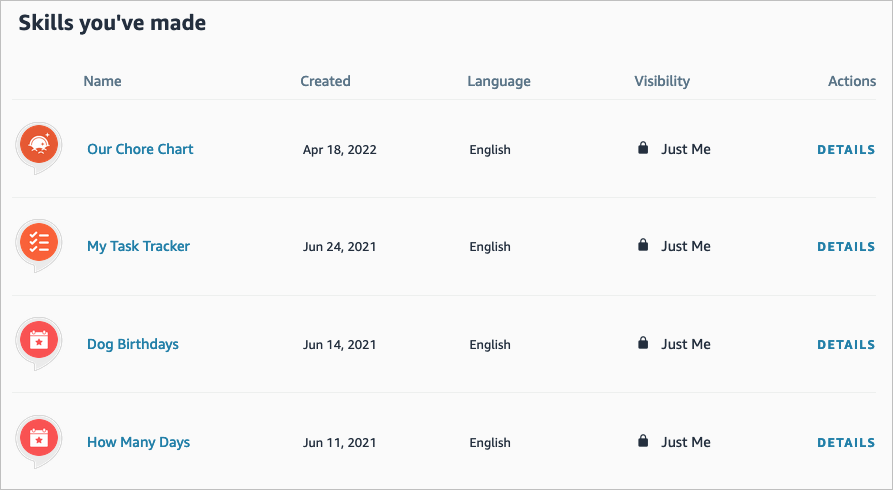
- Visit the Alexa Blueprints website and sign in. Select Skills You’ve Made at the top.
- You’ll see a list of your skills. Choose Details to the right to open the one you want to edit.
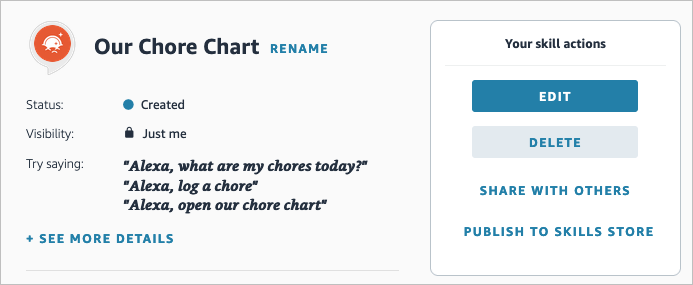
- On the right side, select Edit or Delete . You’ll notice you can also pick Share With Others to make it easy for your family or friends to access or Publish to Skills Store for other Alexa users.
Your Skills in the Mobile App
You can edit your custom skills easily in the Alexa mobile app as well.
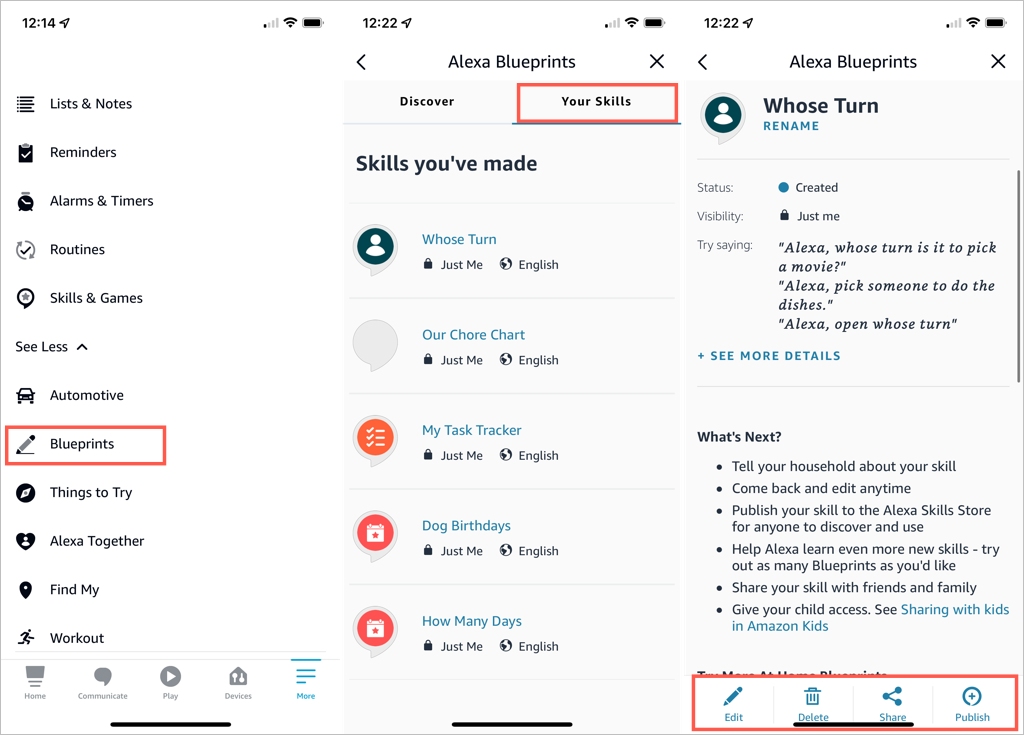
- Go to the Menu tab.
- Select See More > Blueprints .
- On the Your Skills tab, select the blueprint you want to edit.
- Use the buttons at the bottom to make your changes.
Take Advantage of Alexa Blueprints
Even though there are many premade skills you can pick from, creating your own Alexa skills gives you great ways to personalize the experience on your Alexa devices, get tasks done, or have a little fun !
- How to Create Alexa Skills for Your Business or Employees
- How to Shop With Alexa for All Your Shopping
- 10 Cool Alexa Tricks to Try With Your Amazon Echo
- How to Change Alexa Language to Spanish and Other Languages
- Why Alexa Is Flashing Yellow, Green, and What Does it Mean?
