
- Your site has to clearly inform the visitors that their personal data is being collected.
- You also need to disclose how and why their data is collected and stored.
- If users ask you to delete personal data you collected, you must comply with the request in most cases.
- Users can also request a copy of all the personal information you store.
- If one of your business’s main activities is to gather and store personal data, you need to hire a data protection officer.
- If your website is breached and the personal information of your users leaks out, you have 72 hours to report the breach.
- Breaking the GDPR regulation can lead to fines of up to €20 million (~$24 million) or 4% of your company’s annual turnover.

Whether you built your website from scratch or used a WordPress theme, your site gathers different types of data. Websites collect information in different ways, including through analytics, WordPress forms, subscription forms, contact forms, and email marketing campaigns.
- Genetic and health information.
- Biometric data.
- Political and/or religious views.
- Race, ethnicity, and gender.
- Web data such as your IP address and cookie data

- You don’t sell your users’ private data.
- You don’t share private data unless the law obligates you.
- The types of data you collect.
- The reasons why you collect data and how you use it.
- How you protect user data.
- How your plugins collect and use data.
2. Create a Cookie Collection Notice
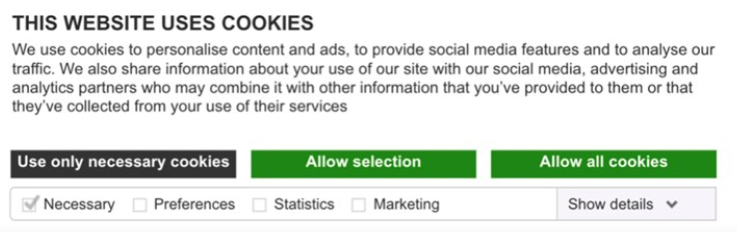
3. Display Notices On All Website Forms
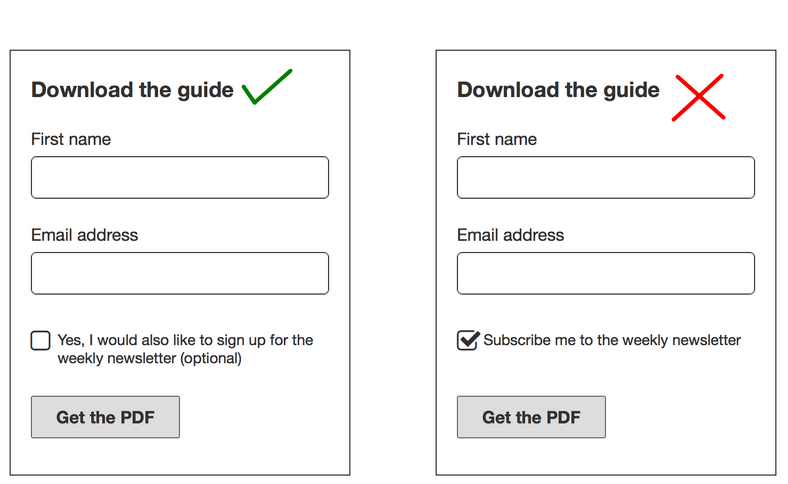
Be as clear as possible with your wording and offer all the important details about collecting data. You should also avoid using pre-checked tick boxes. The user needs to understand that data collection is optional and that it requires their consent.
5. Use the Double Opt-in
To add a double opt-in, you need to first request consent through the website’s subscription form. Then the user should consent a second time by clicking a link they receive through email.

7. Delete Personal Data on Request
8. Don’t Buy Mailing Lists
- How to Fix Slow Wi-Fi on Your Smartphone
- 7 Best Machine Translation Software (or AI) to Try in 2025
- What Does the Green Dot Mean on Facebook?
- How to Turn off Hardware Acceleration in Chrome
- How to Check VRAM in Windows 10, 11, and macOS?
