Can’t delete a reminder in Outlook 2007, 2010, 2013 or 2016? I recently had this very strange problem where I created a calendar event in Outlook with a reminder attached to it, the event passed, I dismissed the reminder, but it wouldn’t go away! The reminder popped up each time I opened Outlook.
Not only that, I deleted the calendar event thinking that it would get rid of the reminder, but it didn’t! So the reminder still lives even though there is no event for it to go with! Strange!
Finally, I figured out how to remove the reminder from a forum post and it’s pretty crazy what you have to do to delete the Outlook reminder.
Delete Outlook Reminder
Step 1: Download and install MFCMAPI (Microsoft Exchange Server MAPI Editor).
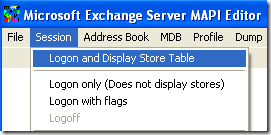
Step 2: Open the program and then click on Session from the top menu and choose Logon and Display Store Table .
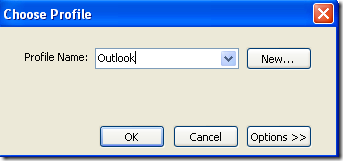
Step 3: Choose Outlook in the dialog that says Choose Profile . Click OK.
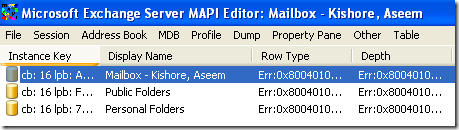
Step 4: Now double-click on the profile that says “ Mailbox ““ Your Name ”
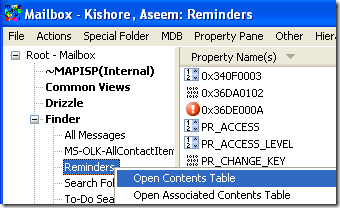
Step 5: A new window will pop up. Expand Root ““ Mailbox and then find Reminders . If it’s not directly under the Root, it may be under Finder . Then right-click on it and choose Open Contents Table .
Step 6: Now find the reminder that you are not able to delete and delete it here. You should be able to identify the reminder by the From, To and Subject fields.
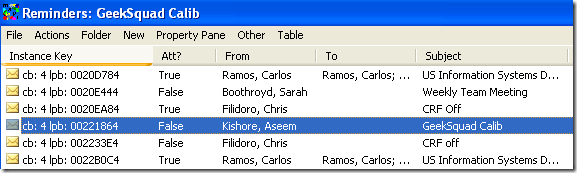
Step 7: If, for some reason you are not able to find the undeletable reminder here, you can simply delete the entire Reminders folder under the Root. The Reminders folder will be re-created again when Outlook starts.
Note that if you delete the Reminders folder, do NOT select “ Hard Deletion ” when the alert window pops up. That’s it! Now the reminder will no longer show up in Outlook and you won’t keep getting those annoying popups saying you missed the appointment! Enjoy!
- How to Report Phishing Emails in Outlook
- Top 6 Ways to Fix Outlook Error 0x8004010f
- How to Make an Email Group in Outlook
- How to Change the Default Browser in Outlook
- How to Pin Emails in Outlook
Founder of Help Desk Geek and managing editor. He began blogging in 2007 and quit his job in 2010 to blog full-time. He has over 15 years of industry experience in IT and holds several technical certifications. Read Aseem’s Full Bio
