Recently, I was working with a client and they had an issue updating their Windows 7 PC. Basically, whenever they tried to run a check for updates, they would get the following error message:
Windows Update cannot currently check for updates, because the service is not running. You may need to restart your computer.
Of course, restarting did not help. When we checked if the Windows Update Service was running, we found that it was running. So now we were confused.
In this situation, you can solve the problem by deleting all the currently downloaded updates and retrying. Sometimes an update gets corrupted and then Windows gets confused and thinks the service is no longer running.
Delete Windows Updates
The first thing to do is to stop the Windows Update service on your Windows 7 machine. You can do this by going to Start and typing in services.msc in the search box.
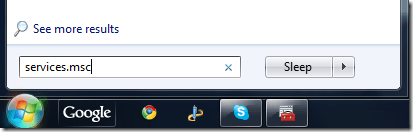
Next, press Enter and the Windows Services dialog will appear. Now scroll down until you see the Windows Update service, right-click on it and choose Stop .
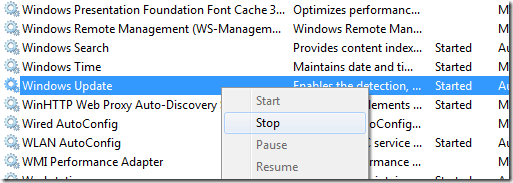
Now that the Windows Update service has been disabled, you need to go to the following folder and delete all the files and folders inside of it:
C:\Windows\SoftwareDistribution\
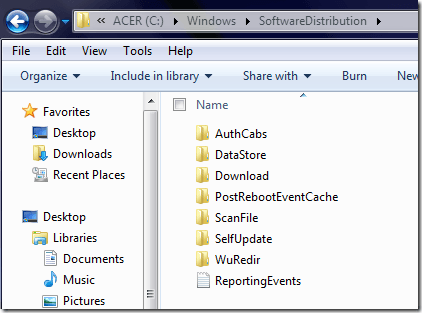
Once you have deleted everything, go back to the Services dialog and right-click on the Windows Update service and choose Start. All the files and folders will be re-created and hopefully you can start downloading updates for your PC.
- How to Use Event Viewer to Troubleshoot Windows Problems
- What Is ehprivjob.exe and Do You Need It?
- How to Boot into Safe Mode in All Versions of Windows
- How To Get Ready For Windows 7 End Of Life
- How To Change The Windows 7 Login Screen Background Image
Founder of Help Desk Geek and managing editor. He began blogging in 2007 and quit his job in 2010 to blog full-time. He has over 15 years of industry experience in IT and holds several technical certifications. Read Aseem’s Full Bio
