The New York Times Company is one of the oldest and most influential newspapers in the United States. You need a digital subscription to access most of the content that NYT produces, but this can quickly get expensive, especially if you don’t read the news as much as you used to.
Below, we’ll explain how to cancel your New York Times subscription in three easy ways.

1. Call or Email Customer Service
The quickest way to cancel your subscription is to call The New York Times help desk and talk to a customer service representative.
You can reach them on 866-273-3612. Their open hours are 7 a.m. to 10 p.m. Eastern Time Monday to Friday and 7 a.m. to 3 p.m. on weekends and holidays.
If you’re outside the US, you can contact them online as below.
You can also email Customer Care at customercare@nytimes.com and request to have your subscription canceled.
Note: When you cancel your digital access subscription, you’ll be able to access The Times for the rest of your current billing cycle. Once that’s over, you won’t be charged again.
2. Chat With a Care Advocate
To do so:
- Open the “ Cancel Your Subscription ” page on The New York Times website.
- Press Chat with us . This feature is available 24/7.

- Ask the customer service representative to cancel your subscription. You may need to provide some account information (like your account number) to prove your identity.

3. Sign In to Your New York Times Account
To do so:
- Open the nytimes.com homepage and select Log In in the top-right corner of the screen.
- Select the Account drop-down menu at the top-right corner, then choose Subscription overview .

- Scroll down to the bottom of the screen and select Cancel your subscription .
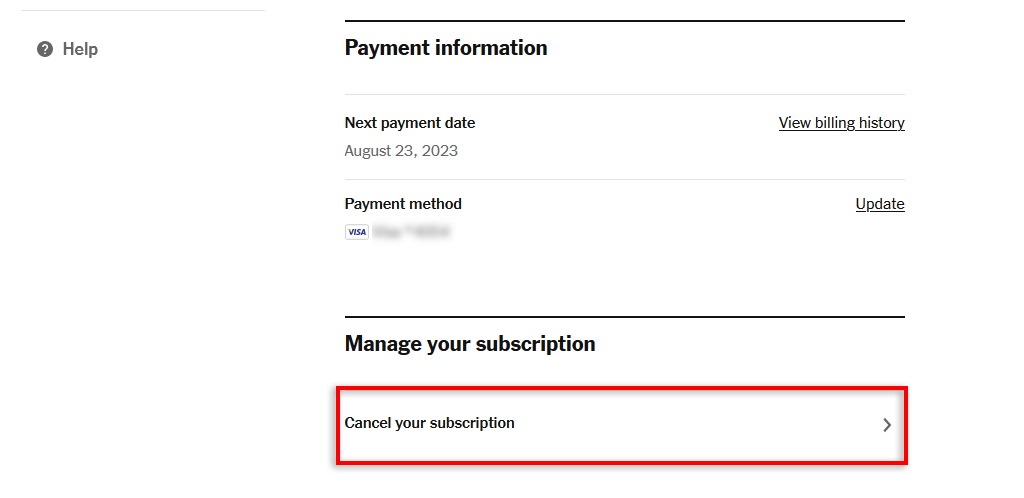
- Select Begin Chat or contact Customer Care with a phone call.
Back to Free Access
The New York Times is a great news outlet up there with some of the other big names, like the Wall Street Journal (WSJ). But, if you find you aren’t using the mobile app, watching their podcasts, reading their articles, or playing the crossword anymore — it’s time to cancel.
Luckily, you’re able to access up to 10 articles for free every month through the NYT app or www.nytimes.com without a paid subscription.
- How to Cancel Your ESPN+ Subscription
- How to Cancel Your STARZ Subscription
- How to Cancel Your Wall Street Journal (WSJ) Subscription
- How to Cancel Your SiriusXM Subscription
- How to Cancel Your Uber One Subscription
