Whether you’ve been a long-time listener deciding it’s time for a change, or perhaps you’re contemplating the switch due to budgetary constraints, there may come a time when you want to cancel your subscription .
Cancel Your SiriusXM Subscription via iOS
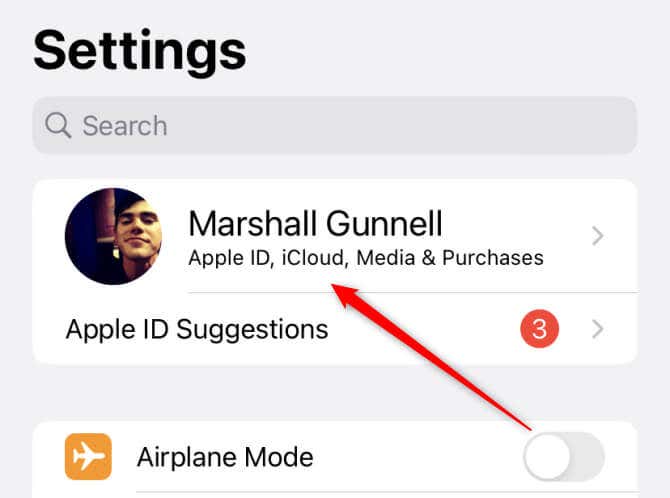
- Open the Settings app and then tap your Profile icon at the top of the screen.
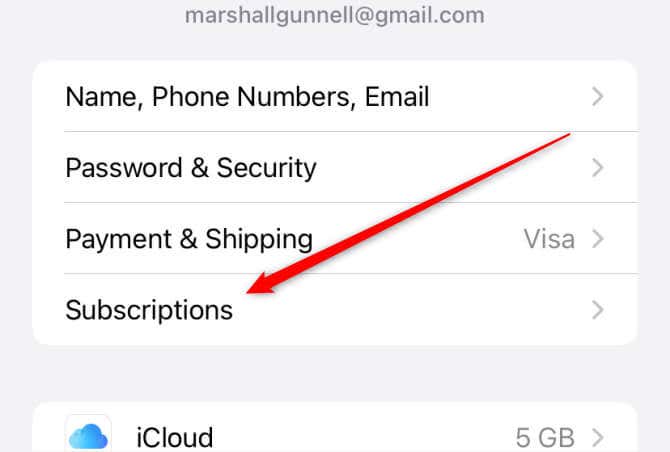
- On the next screen, tap Subscriptions .
- Finally, select SiriusXM and then tap Cancel Subscription .
Cancelling your subscription will prevent future payments, but your service will continue until the end of the current billing period.
Cancel Your SiriusXM Subscription via Android
Similar to iOS, if you signed up to SiriusXM using an Android device, you’ll need to cancel it from one.
- Launch the Google Play Store app and then tap your profile image in the top-right corner.
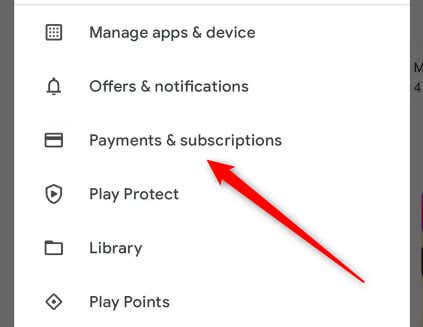
- Tap Payments & Subscriptions > Subscriptions .
- Select the SiriusXM app from the list and then tap Cancel Subscription .
Your subscription will remain active until the end of the current billing cycle, but it won’t renew.
Contact Support
If you signed up to SiriusXM using a different method, such as through the website or if it was included with your car, you’ll need to contact the support team directly to cancel the subscription.
You can contact support by calling them at 1-866-635-8641 , or by chatting with a live agent on their official website.
Before contacting an agent, make sure you have your account number or your radio ID (referred to as ESN or RID) readily available for a smoother process. You can find your account number in the top-right corner of your account center.
Once you’re connected with a representative, let them know you want to cancel your subscription. They may ask for reasons behind the cancellation, and potentially offer deals or incentives to keep it going. Remember, it’s your right to insist on cancellation if that’s your decision.
Your Subscription, Your Control
Whether you signed up to SiriusXM via iOS, Android, or some other method, you can always take control of your subscription status.
Always remember that your subscription decisions should best serve your needs and preferences. The process of cancelling a subscription is fundamentally a consumer right. Be it a shift in listening habits, a budget decision, or any other personal reason, the ability to freely make changes to your services is always there.
- How to Cancel Your ESPN+ Subscription
- How to Cancel Your STARZ Subscription
- How to Cancel Your Wall Street Journal (WSJ) Subscription
- How to Cancel Your New York Times Subscription
- How to Cancel Your Uber One Subscription
