One thing I’ve always enjoyed about working in IT over the last 8 years is trying to successfully find a solution to tough Windows error messages. I’ve written about many before, such as The Device Cannot Start , Stop: 0x00000F4 error blue screen , etc.
Another one I came across recently was the following:
Microsoft (C) Register Server has stopped working
I got this message when trying to register a DLL using the regsvr32 command from the command line on Vista Ultimate x64. I’ve registered DLLs before on Vista Business x32 without a problem, but hadn’t tried it on the x64 edition.
Usually, it seems this error occurs more often on Windows Vista or Windows XP x64 editions and it is mainly caused by the Data Execution Prevention feature of Windows Vista, aka DEP. In order to fix it, you have to add an exception for regsvr32 in the DEP dialog. Here’s how:
Add Exception to DEP
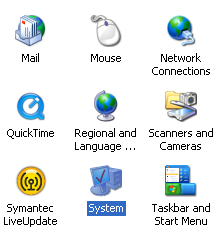
Step 1: Go to Start , Control Panel and click on System .
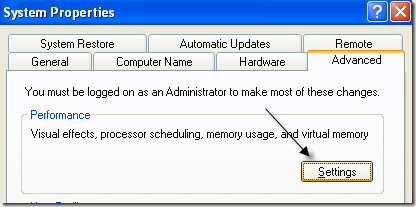
Step 2: Now click on the Advanced tab and under Performance , click on Settings .
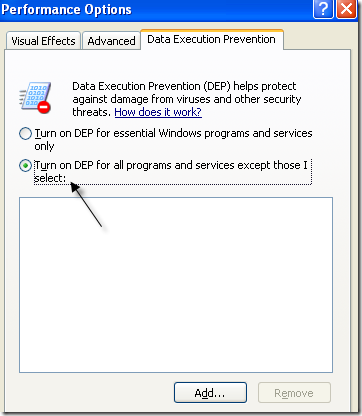
Step 3: Click on Data Execution Prevention and select the Turn on DEP for all programs and services except for those I select: radio button.
Step 4: Now click the Add button and browse to C:WindowsSystem32 and choose the regsvr32.exe file. When you get the message stating it could make your computer become unprotected and vulnerable to attacks, just click OK to continue.
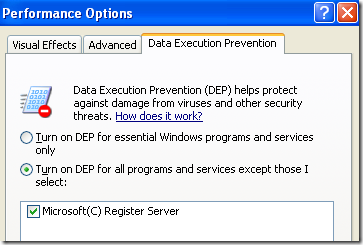
Click OK and then click OK again to exit. Now try to run the regsvr32 command again from the command line and you should hopefully not get this error! If you do, post a comment and I’ll try to help! Enjoy!
- How to Backup an iPhone Without iCloud?
- Sluggish Windows 11 PC? Try These 5 Windows 11 Tricks to Free up Virtual Memory
- macOS Tahoe Privacy Settings You Need to Secure Your Mac
- How To Turn Off Notifications On Windows 11?
- How to Recover Lost Files After Windows Update?
Founder of Help Desk Geek and managing editor. He began blogging in 2007 and quit his job in 2010 to blog full-time. He has over 15 years of industry experience in IT and holds several technical certifications. Read Aseem’s Full Bio
