If you are experiencing performance issues with Tomcat, a common cause is the lack of JVM (Java Virtual Machine) memory allocation. The default setting of the maximum heap size is 64MB or 128MB. You can increase the maximum heap size of applications by setting the -Xmx JVM parameter.
For example, -Xmx512m allows maximum 512MB heap to be allocated for the JVM. To adjust this parameter, right click the My Computer icon, then choose the Advanced tab. Click the Environment Variables button:

Create the CATALINA_OPTS variable, and set the desired value, for example “ -server -Xmx256m “.
If you are running on Linux or UNIX, go to the terminal and use the tomcat account by using sudo su – tomcat or a corresponding account name depending on your setup. You should use the account that is used to run Tomcat.
Check both CATALINA_OPTS and JAVA_OPTS environment variables. Set the environment variables to a higher value. For example, if the JAVA_OPTS variable is containing a minimum of 64MB and 128MB maximum heap size, increase it to 128MB and 256MB values.
OLD: JAVA_OPTS="-Xms64m -Xmx128m -Dsun.rmi.dgc.client.gcInterval=3600000 -Dsun.rmi.dgc.server.gcInterval=3600000"


OLD: JAVA_OPTS="-Xms128m -Xmx256m -Dsun.rmi.dgc.client.gcInterval=3600000 -Dsun.rmi.dgc.server.gcInterval=3600000"
Make sure to use a maximum value that is less than your physical RAM’s size, otherwise it will be paged to the hard disk, which could cause more performance issues.
To check if the new settings are in effect, go to the URL of your Tomcat server and then click Status :
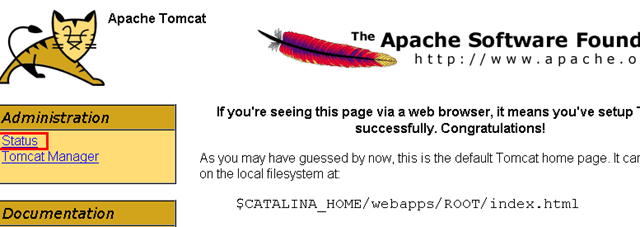
You should see a new value under the JVM section:

- How to Backup an iPhone Without iCloud?
- Sluggish Windows 11 PC? Try These 5 Windows 11 Tricks to Free up Virtual Memory
- macOS Tahoe Privacy Settings You Need to Secure Your Mac
- How To Turn Off Notifications On Windows 11?
- How to Recover Lost Files After Windows Update?
Founder of Help Desk Geek and managing editor. He began blogging in 2007 and quit his job in 2010 to blog full-time. He has over 15 years of industry experience in IT and holds several technical certifications. Read Aseem’s Full Bio
