You might want to share your YouTube videos on Instagram to grow your brand and generate engagement, but how do you share YouTube videos on your Instagram Story? There’s no way to directly share a YouTube video on your Instagram Story, but there is a way to get around this.

How to Share YouTube Videos on Your Instagram Story
How to Share YouTube Video on Instagram Story With a Link
It’s easy to share YouTube Video on Instagram Story via a link, and here’s how to do that. You’ll need the YouTube and Instagram apps installed on your device before we get started.
- Open the YouTube app and find the video you want to share.
- Click the Share button beneath the video, then tap the Copy Link button.
- Open the Instagram app and tap the + (add) icon at the bottom of your screen.
- At the bottom, tap on Story .
- You can take a picture for your Story by tapping the white circle , or tap the image library in the bottom left to select an existing image.

- Tap the Stickers icon at the top right, then scroll down and tap the Link option.
- Paste your YouTube link into the URL box and tap Done .
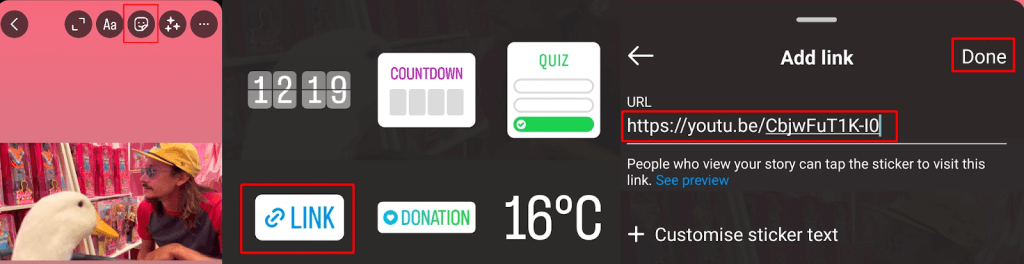
- You can now edit your story by adding stickers, text, filters, etc.
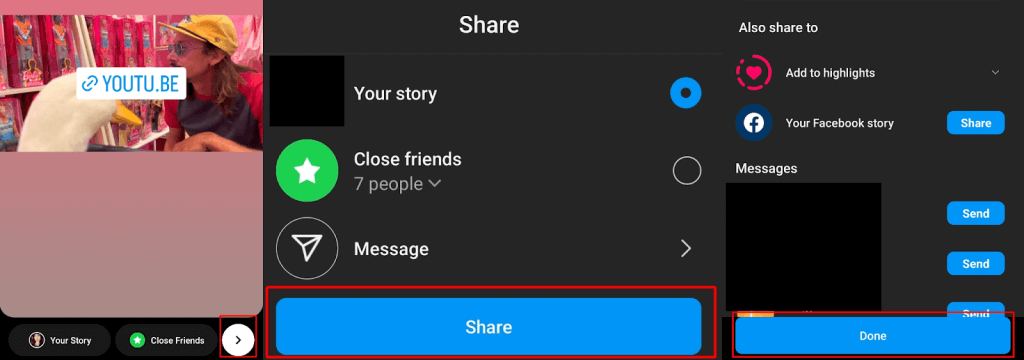
- Once you’re done, tap the white arrow icon at the bottom right to share your story.
- Then tap Share on the following screen.
- On the Also share to screen, select anybody you wish to share the story with as a DM (or select to share it to Facebook or add it to your highlights), then tap Share .
The Right Way to Share YouTube Videos in a Post
As you can see, it’s pretty easy to share YouTube videos via link to your Instagram Story. We’ve got some more fun and creative ideas for your next Instagram story too, including how to change your Instagram Story background color .
- How to See Watch History on Instagram
- How to Fix Instagram Notes Not Showing
- How to Hide Followers on Instagram and Protect Your Privacy
- How to Reset Your Instagram Explore Feed
- How to Turn Off Instagram Read Receipts
