When you need to type something on your Apple TV, Apple gives you a convenient way to do so using your iPhone or iPad . But if you want to stop receiving notifications for this, you can turn off the feature.
About the Apple TV Keyboard Notification
Whenever your Apple TV believes you want to type something, like a password for parental controls or a search term in the App Store, you’ll see the keyboard input notification automatically pop up on your iOS device.
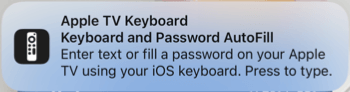
Note : You’ll only see the notification if you’re signed into both devices with the same Apple ID and have Bluetooth and Wi-Fi enabled.
You then tap the notification on your Home or Lock screen. When the text input box appears, use your iPhone’s keyboard to enter the text. You’ll see it displayed in the text field on your Apple TV as you type.

While convenient, it can be distracting or unnecessary if you prefer to enter text using your Apple TV Remote or Siri Remote .
Disable the Apple TV Keyboard Notification
You can turn off the Apple TV keyboard notification on your iOS or iPadOS device in just a few steps.
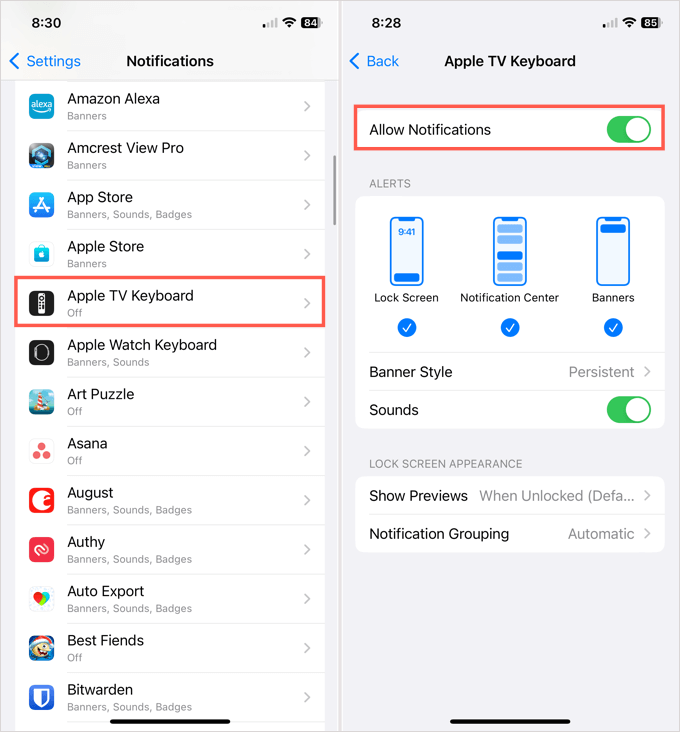
- Open the Settings app on your iPhone or iPad.
- Choose Notifications .
- Scroll down and select Apple TV Keyboard .
- Turn off the toggle at the top for Allow Notifications .

That’s all there is to it. Because it’s so easy to turn the notification on or off, you can enable it again anytime by turning that toggle back on. You can select the notification style, sound, and other alert options.
For additional ways to use your devices with your television, look at how to connect AirPods or AirPods Pro to Apple TV .
- How to Use Your iPhone as a USB Drive on Mac and PC
- How to Charge Your Apple TV Remote
- How to Turn Off Password Suggestions on iPhone
- How to Accept Invite to Shared Album on iPhone
- How to Send Emails on iPhone
