About a year ago, WhatsApp released a privacy feature that silences unknown callers. Now, WhatsApp is developing a similar message-focused variation to help users block messages from unknown or unsaved numbers.
WhatsApp introduced the feature (dubbed “Block unknown account messages”) in an earlier Android beta release (2.24.17.14). However, all beta testers can now access and use the feature in the latest beta version (2.24.20.16).
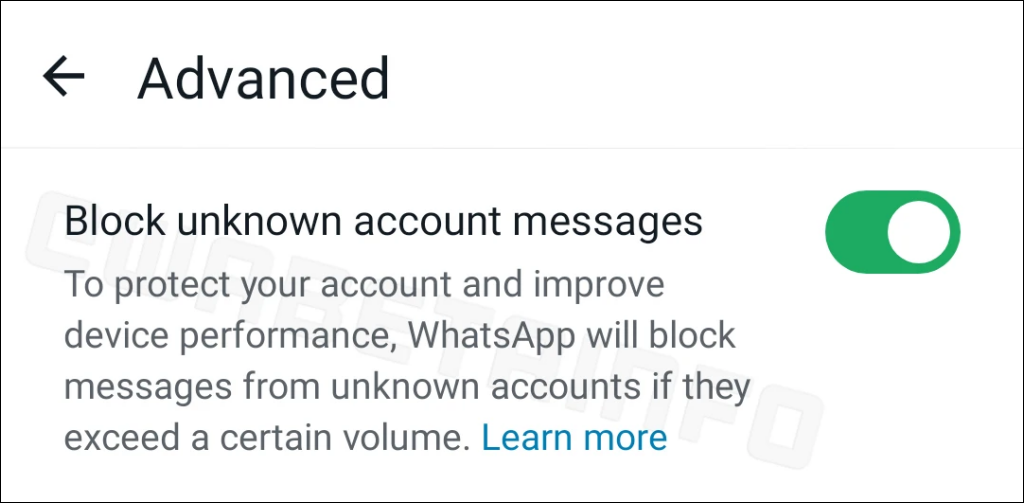
<img loading=“lazy” src=“https://www.online-tech-tips.com/wp-content/uploads/2024/09/whatsapp-beta-block-messages-from-unknown-accounts.png" onerror=“this.onerror=null;this.src=‘https://blogger.googleusercontent.com/img/a/AVvXsEhe7F7TRXHtjiKvHb5vS7DmnxvpHiDyoYyYvm1nHB3Qp2_w3BnM6A2eq4v7FYxCC9bfZt3a9vIMtAYEKUiaDQbHMg-ViyGmRIj39MLp0bGFfgfYw1Dc9q_H-T0wiTm3l0Uq42dETrN9eC8aGJ9_IORZsxST1AcLR7np1koOfcc7tnHa4S8Mwz_xD9d0=s16000';" alt=““Block unknown account messages” feature in the WhatsApp beta for Android app version 2.24.20.16 - 2”>
SourceWABetaInfo
The screenshot above says WhatsApp will only block messages from unknown accounts “if they exceed a certain volume.” That means the feature won’t block all messages from unknown senders. Instead, WhatsApp blocks messages from unknown numbers that usually send excessive messages within a short period. That’ll prevent users from missing important messages from unknown accounts.
WhatsApp will reportedly use an algorithm that tracks messaging rates to identify accounts that send an unusual number of messages in a short period. It’ll then block messages from unknown accounts with suspicious or spam-like messaging rates. Beta testers also report that WhatsApp automatically recommends the feature to users who often receive spam messages from unknown accounts.
It’s important to note that the messaging restriction placed on unknown accounts isn’t permanent. The algorithm keeps tracking blocked accounts and lifts the restriction when their messaging rate/volume becomes normal.
The feature is available in the advanced privacy menu of the latest WhatsApp beta version (for Android). Users can turn it on via Settings > Privacy > Advanced > Block unknown account messages .
We’re sure it’ll take a few weeks (of rigorous testing and enhancement) before the feature rolls out to the public version.
- WhatsApp Introduces “Custom Lists” for Better Chat Filtering
- WhatsApp Launches Cloud-Based Contact Managment Feature
- You Can Now Mention People in Your WhatsApp Status
- You Can Now Use GIPHY and Create AI Stickers on WhatsApp
- Vibe Coding 101: Your Guide to AI-Powered Programming