If you’ve recently upgraded to Windows 7 or did a clean install of Windows 7, the first thing you’ll want to do is run Windows Update to download the latest security patches and fixes.
However, you may also get an error message with the following error code below:
0x80073712
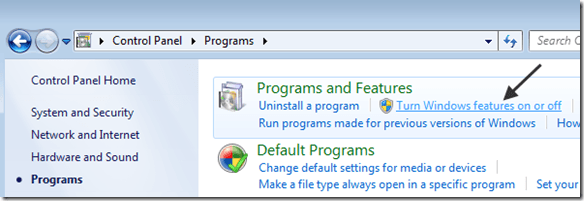
Or if you go into the Control Panel and click on Turn Windows features on or off, you may see that the Windows features dialog box is empty.
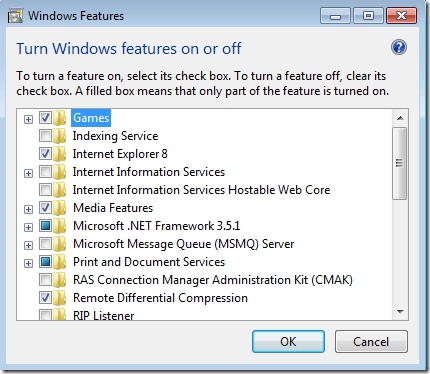
If Windows is working normally, the Windows features dialog should look like this:
This error will also cause you to see a log entry in the System log in Windows Event viewer with the following description:
Windows Servicing failed to complete the process of setting package xxxxxx (Software Update) into Default(Default) state
In order to fix the problem, there are two possible solutions. For either one, you need to make sure the account you are logged into has administrative credentials. If so, then try the methods below to fix the blank or empty Windows features dialog box.
Method 1 – Run System File Checker
The first way to fix this problem is to run the System File Checker tool, which will scan all the system files for Windows 7 or Vista and replace any corrupted, missing, or incorrect files with the original correct versions.
To run System File Checker in Windows 7, click on Start and type in CMD in the search box. Right-click on cmd.exe file and choose Run as Administrator .
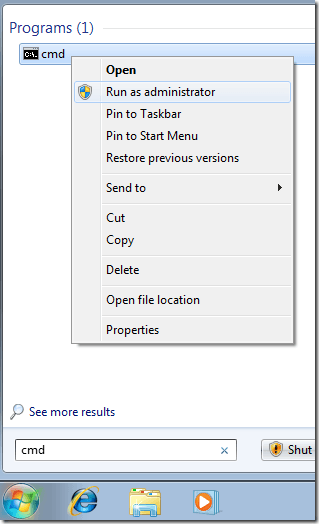
Now type in the following command at the prompt:
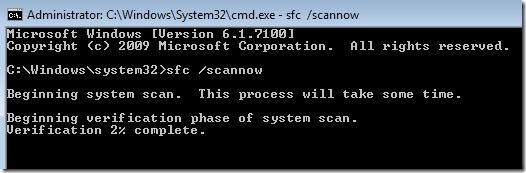
sfc /scannow
The scan will take a little while to complete and may also ask for the original Windows installation CD.
Try running Windows Update again or try going into Windows Features and seeing if everything has come back into the list. If not, try method 2.
Method 2 – Perform a System Restore
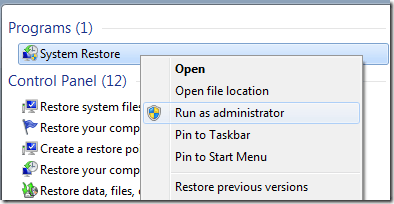
You may have to restore your operating system to a previous state in which the problem did not exist. You can perform a system restore in Windows 7 by going to Start and typing in “system restore” in the search box:
Click Next when the dialog pops up and then choose one of the previous restore points from the list and click Next.
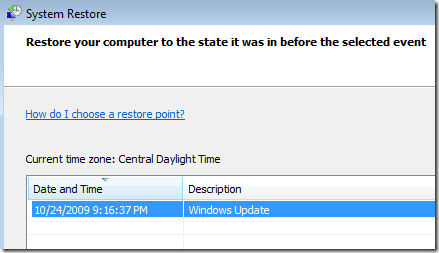
Hopefully once the restore is finished, you can either install Windows updates or not have a blank Windows Features dialog box. If you still have the problem, post a comment and I’ll try to help!
- How to Reset Your Computer Password If You Lock Yourself Out
- Best Ways to Quickly Hide Windows Applications
- Fix Missing System Restore Points in Windows Vista and 7
- Remove Windows Messenger from Windows 7, Vista, and XP
- Restart the Explorer.exe Process Correctly in Windows
Founder of Help Desk Geek and managing editor. He began blogging in 2007 and quit his job in 2010 to blog full-time. He has over 15 years of industry experience in IT and holds several technical certifications. Read Aseem’s Full Bio
